Talon · AI analyst in Skylit · Beta

Ask the chart what matters. Keep the call.
Talon is the analyst built into Skylit. Ask about the chart or map you have open and get a short, sourced read of the options structure, flow and news.
The problem
Your question is simple. Getting the answer isn't.
- You want to know where this stalls and what has to break for it to run. Reading the whole options map to find out takes time.
- Levels, flow, dark pool, earnings and news all sit on different screens, and you're the one stitching them together.
- A general chatbot gives you a level from memory, with no way to tell where that number came from.
With Talon
One question, from the page you're already on
Talon sees the page you have open and the ticker in focus, so on an NVDA chart "what are the levels?" is a complete question. It answers from live Skylit data and the Skylit Academy: the gamma (GEX) and vanna (VEX) map, options flow, dark pool prints, company events and news. You get the structure: the levels it points to, the price that would prove the idea wrong, and the risk-to-reward between them. Whether to act stays with you.
How it works
Talon, step by step
Open it anywhere
Press Cmd + \ on Mac or Ctrl + \ on Windows, or tap the round Aegis button and pick Talon. It is one conversation and one history everywhere you open it.
Match your timeframe
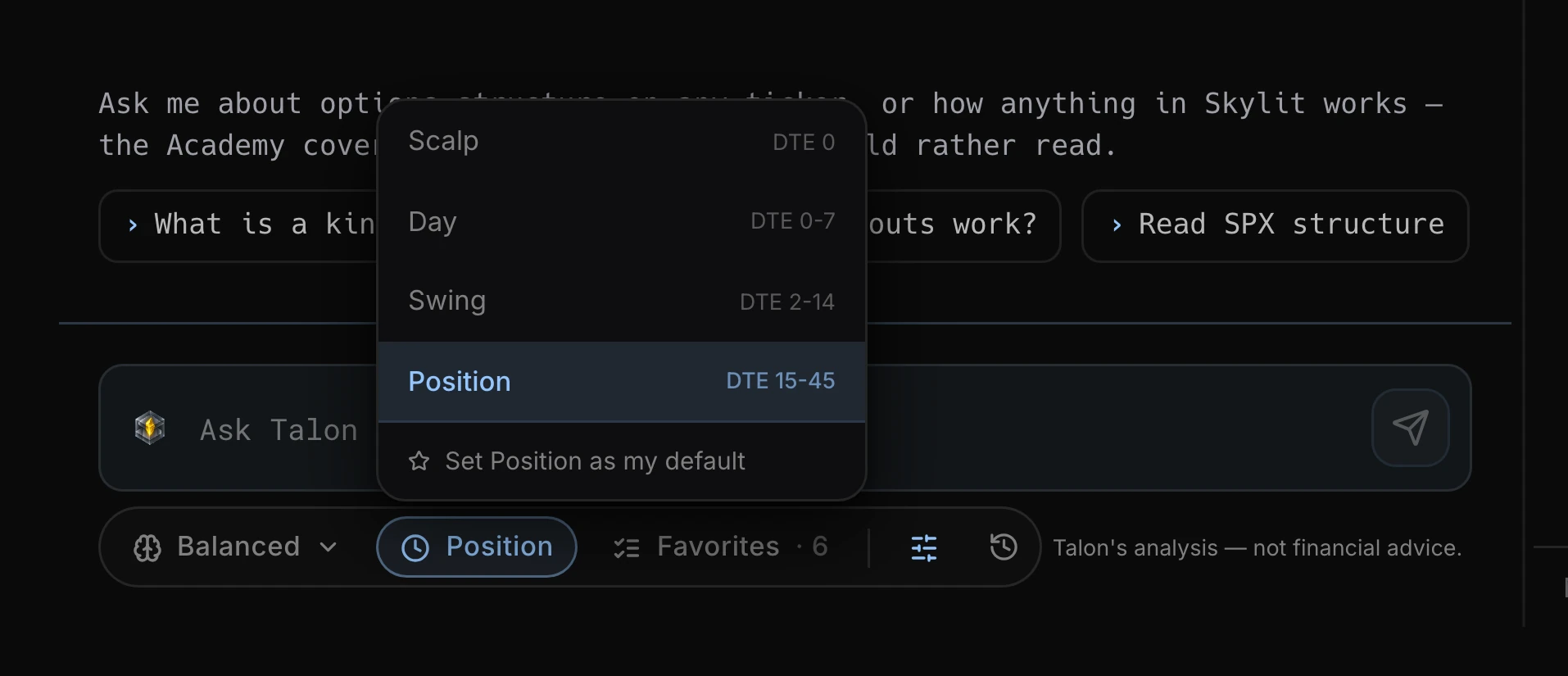
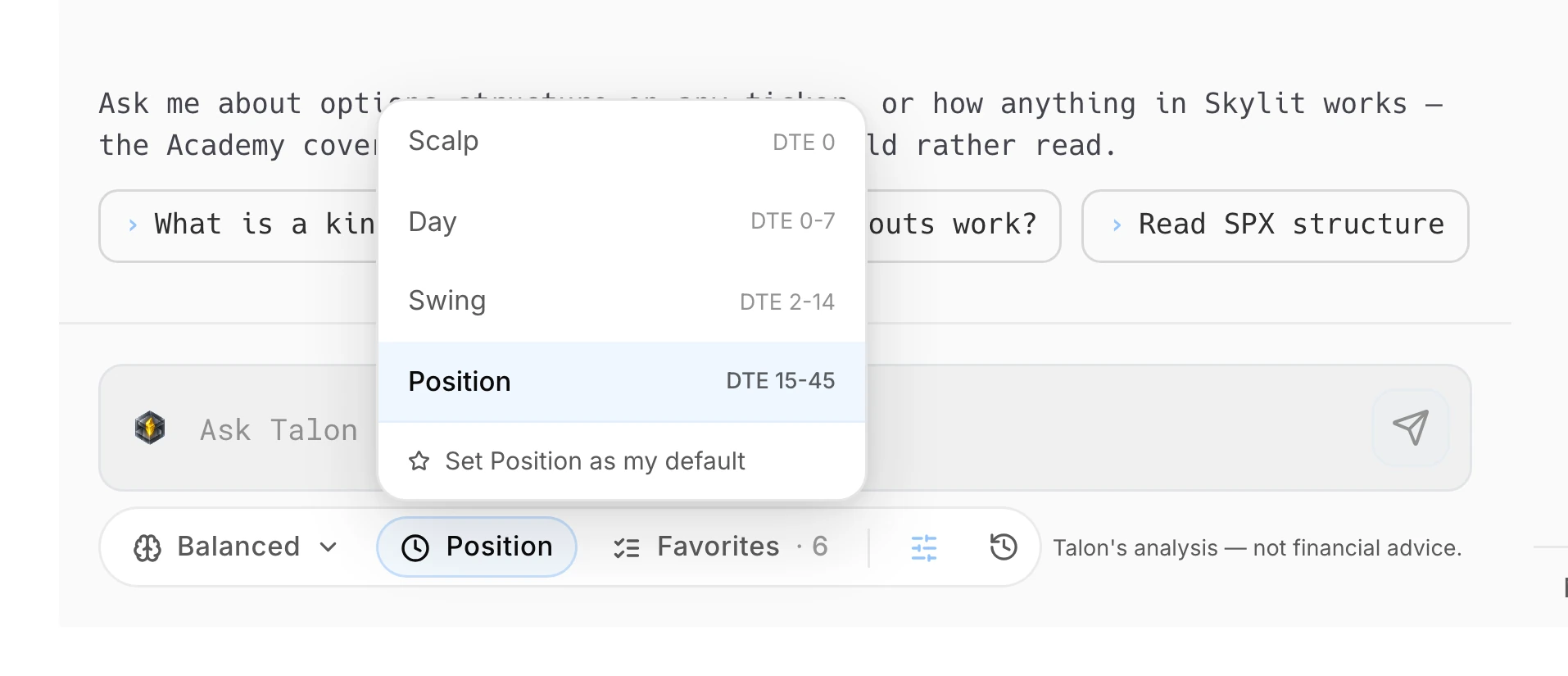
Pick Scalp, Day, Swing or Position under the message box. It decides which expirations Talon reads, so a scalp read and a position read of the same ticker can rightly disagree.
Ask a pointed question
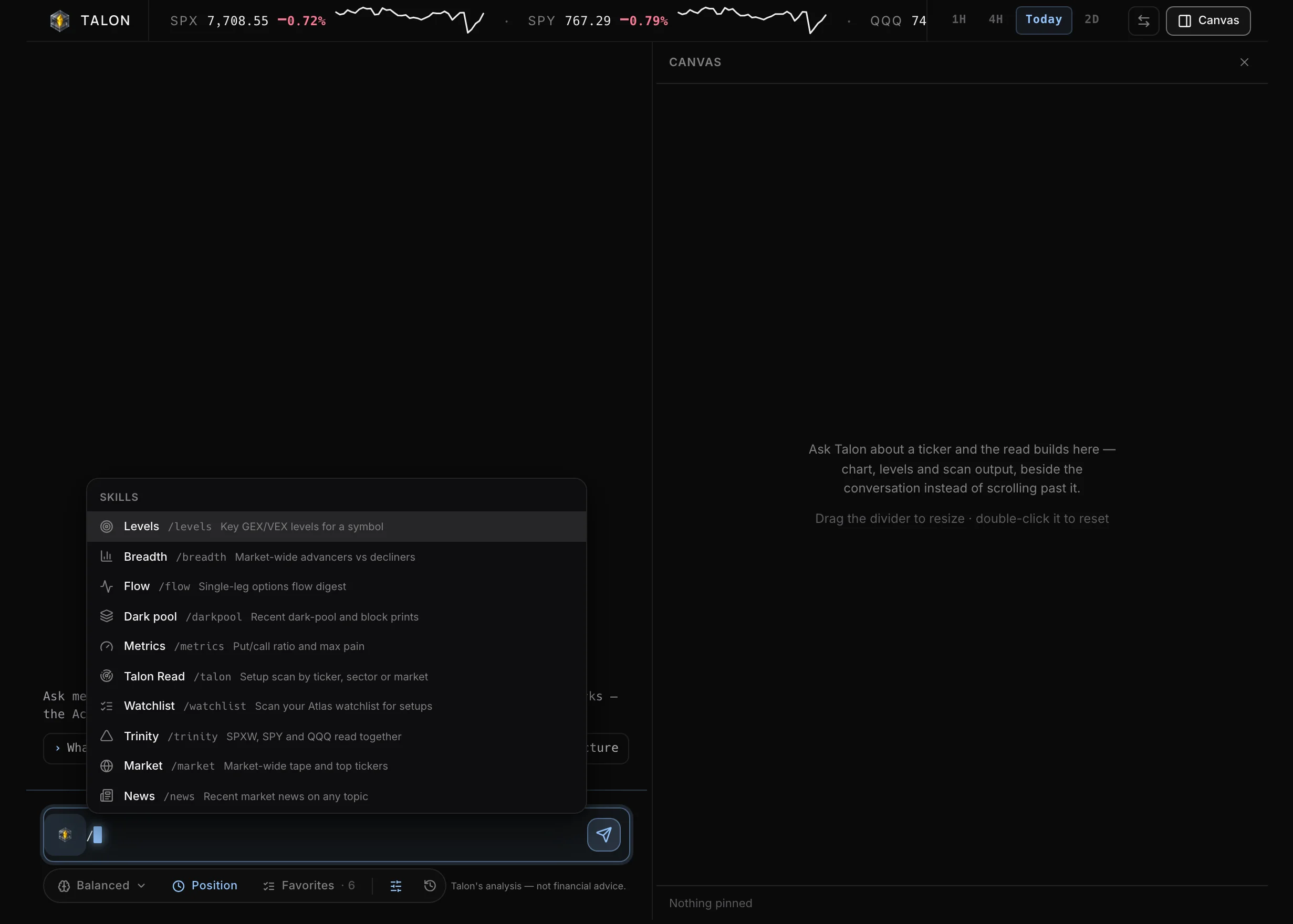
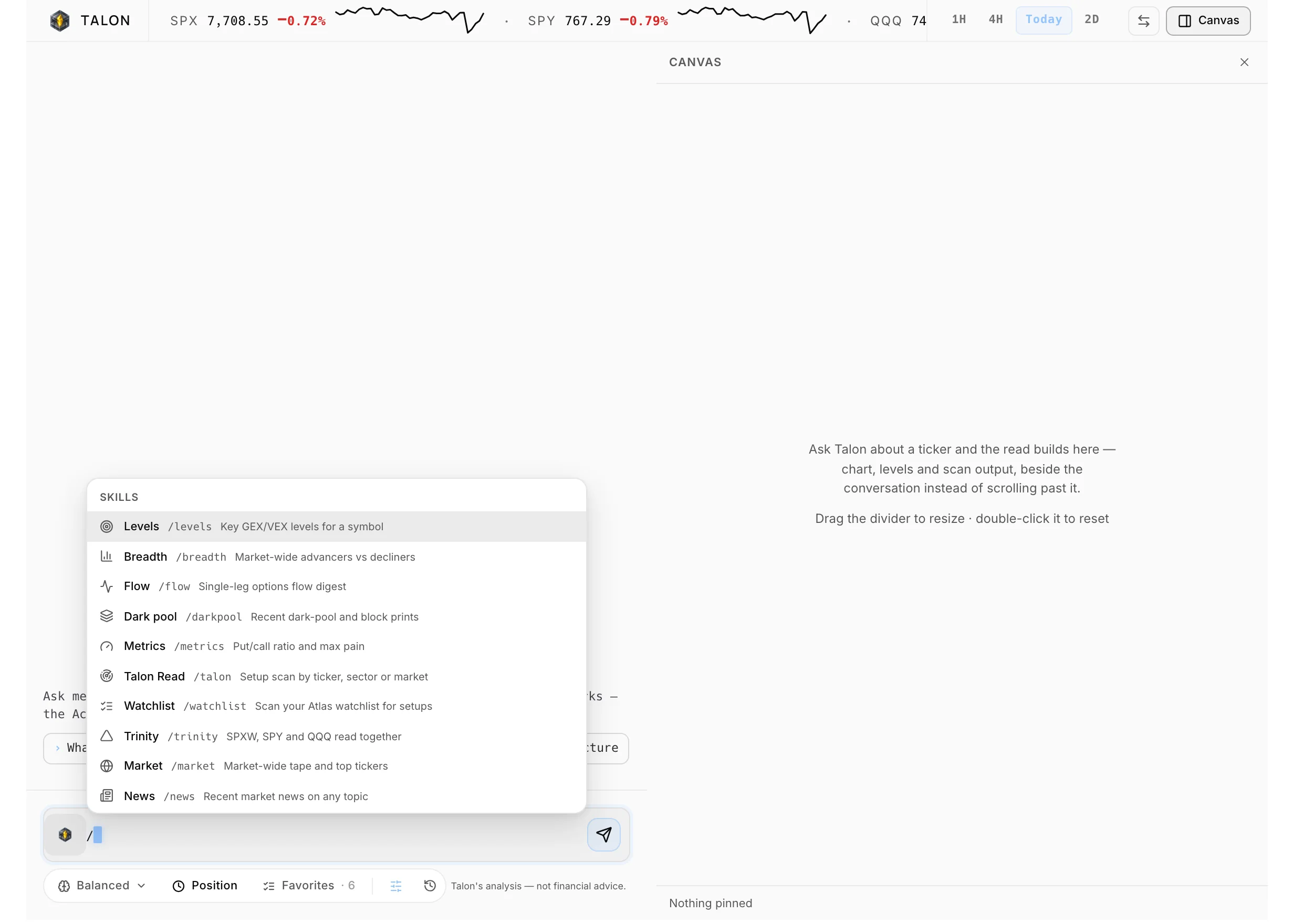
"Where does this turn?" or "what has to break for this to run?" gets more than "give me the levels." Or type / for a slash command like /levels, /flow or /trinity.
Check it and push back
Compare any level with the Heatseeker map or Atlas chart it came from. If a number looks wrong, say so: Talon fetches the data again and shows its source.
01 / 04Open it anywhere
Capabilities
What you can do with Talon
Get the key levels on any ticker
/levels returns the key GEX/VEX levels, each labeled with its instrument. /trinity reads SPXW, SPY and QQQ together and tells you whether they agree.
See the trade map on one screen
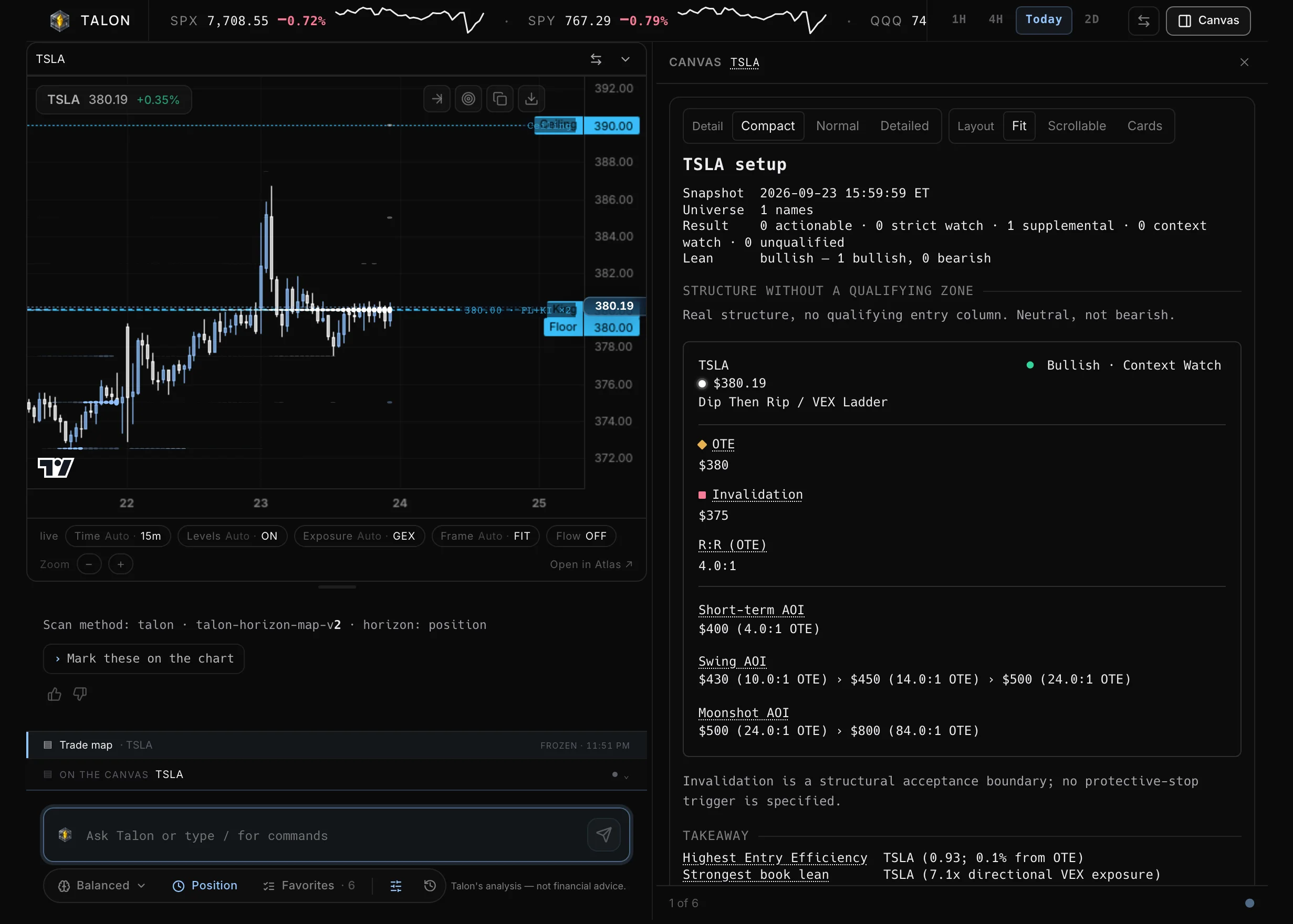
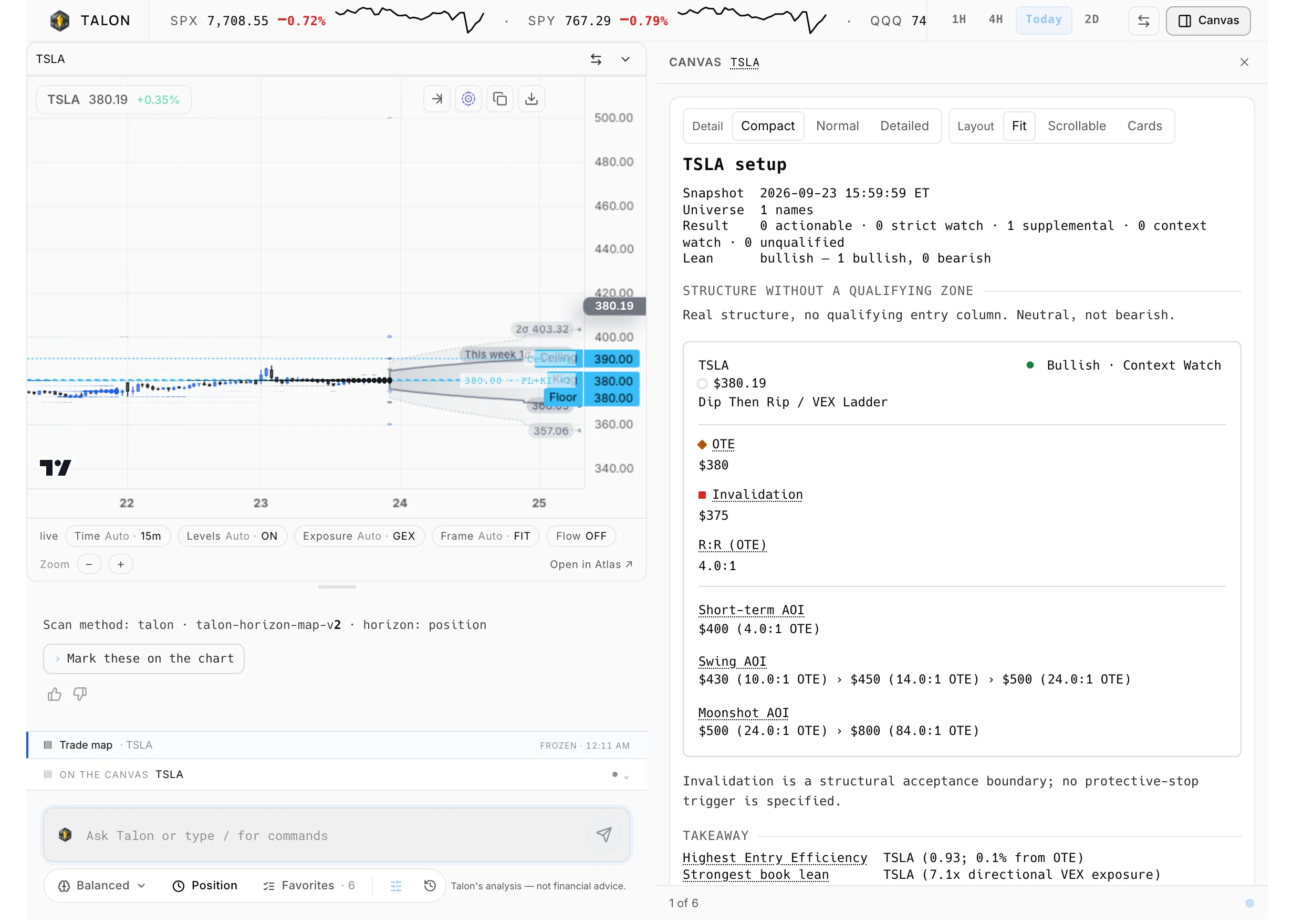
/talon NVDA lays out the structure as a card: an entry reference, the levels the structure points to with their expiry, the structural invalidation and the risk-to-reward. It describes the structure; it does not make the decision.
Scan a sector, theme or watchlist
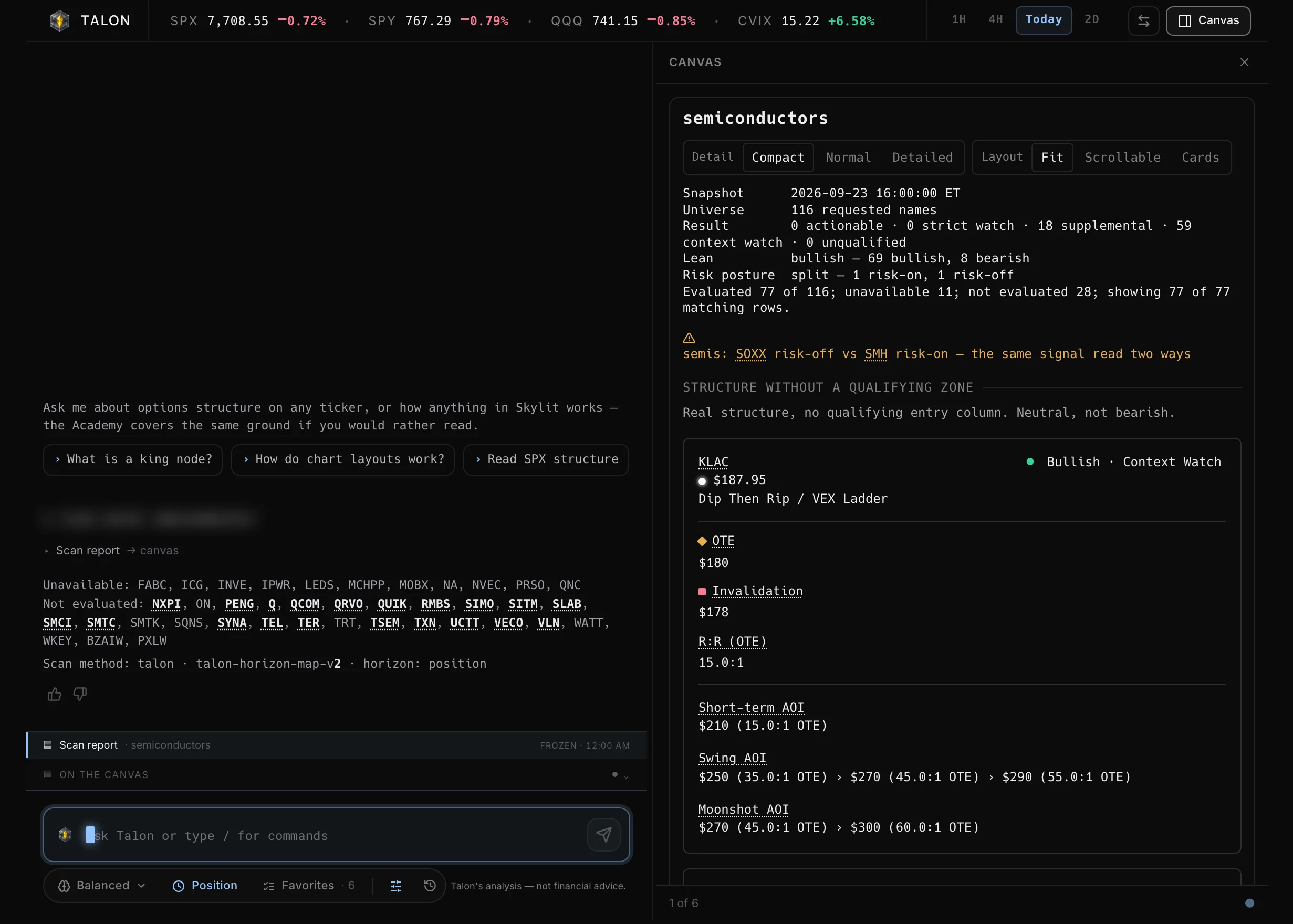
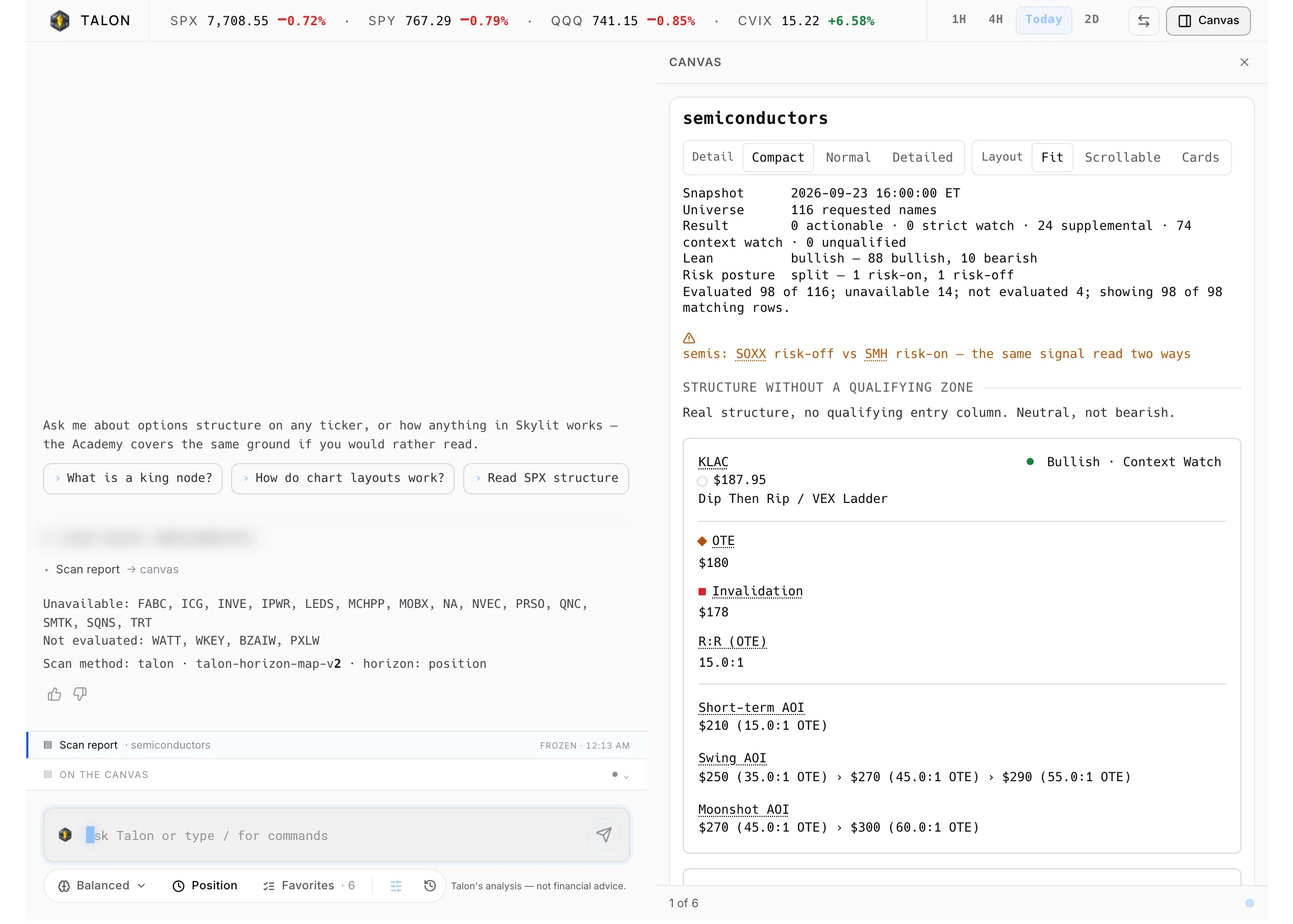
Run /talon sector semis, a theme like ai or datacenters, or /watchlist on your Atlas list to see which names have structure. Scans tell you how many names they read, and "nothing qualifies" is a real answer.
Read flow, dark pool, earnings and news
/flow shows today's single-leg flow against the week and the premium leaders. /darkpool covers off-exchange block prints over five sessions. /earnings and /news fill in dates and recent headlines with their publisher.
Research a company in plain words
Ask what a company does, who its peers are, and what insider and Congress filings show. Research answers cite their sources.
Work full screen with a live chart
On Pro, the /talon full page puts a live chart of the symbol you are discussing next to the conversation, with SPX, SPY, QQQ and CVIX across the top. Talon can mark its levels on that chart.
Every feature
Everything in Talon
42 features · 6 groups
Keyboard shortcut
Bring Talon up beside any page without leaving it: press Cmd + \ on Mac or Ctrl + \ on Windows.
Guide: Keyboard shortcut (opens the docs in a new tab)Aegis panel, Talon tab
Reach Talon from any page with the round Aegis button (bottom right on desktop, the right edge on a phone), then the Talon tab; you can drag the button somewhere else.
Guide: Aegis panel, Talon tab (opens the docs in a new tab)One conversation everywhere
Move between the side panel and the full page mid-thought and keep the same conversation, history and settings.
Guide: One conversation everywhere (opens the docs in a new tab)Plans
See what your plan includes: the Talon tab and the full page are for Pro members.
Guide: Plans (opens the docs in a new tab)Disclaimer
Know the ground rules before your first question: a short notice that Talon is educational, can be wrong and leaves every decision to you, shown again whenever its text changes.
Guide: Disclaimer (opens the docs in a new tab)
Timeframe
Keep the read matched to your holding period by picking Scalp, Day, Swing or Position under the composer, and mark one as your default.
Guide: Timeframe (opens the docs in a new tab)Effort
Trade speed for depth with Fast, Balanced or Deep in the same row; Deep suits questions that chain several reads.
Guide: Effort (opens the docs in a new tab)Watchlist chip
Choose which Atlas list a plain /watchlist scans, from the chip under the composer.
Guide: Watchlist chip (opens the docs in a new tab)Prose or Concise
Get the reasoning in a few sentences, or short field blocks for comparing names, from settings > Answers > Mode or with /concise.
Guide: Prose or Concise (opens the docs in a new tab)Follow-ups
Turn the three suggested next questions under each answer on or off in settings > Answers, or with /suggest.
Guide: Follow-ups (opens the docs in a new tab)Question queue
Type your next question while Talon is still answering; up to three wait and go out in order.
Guide: Question queue (opens the docs in a new tab)
Slash menu
Get exactly one read with no guessing: type / in the composer and the closest matches come first.
Guide: Slash menu (opens the docs in a new tab)/levels
See the key GEX/VEX levels for the page's ticker or one you type, each labeled with its instrument.
Guide: /levels (opens the docs in a new tab)/talon (Talon Read)
Lay out one name's trade map with its reference levels, invalidation and risk-to-reward, by typing /talon and a ticker.
Guide: /talon (Talon Read) (opens the docs in a new tab)Sector, theme, market and universe scans
Find which names in a group have structure with /talon sector, theme, market or universe, and check the Scanned line for how many names were read.
Guide: Sector, theme, market and universe scans (opens the docs in a new tab)/watchlist
Scan every name on one of your Atlas watchlists, or Favorites when you name no list.
Guide: /watchlist (opens the docs in a new tab)/trinity
Read SPXW, SPY and QQQ together and see whether they agree.
Guide: /trinity (opens the docs in a new tab)/breadth
Tell a broad move from a narrow one with advancers against decliners across the S&P 500 and Nasdaq 100.
Guide: /breadth (opens the docs in a new tab)/flow
See today's single-leg flow against the week and the premium leaders with their side of the trade.
Guide: /flow (opens the docs in a new tab)/darkpool
Check off-exchange block prints for a ticker over the last five sessions.
Guide: /darkpool (opens the docs in a new tab)/metrics
Get a ticker's put/call ratio and max pain in one line.
Guide: /metrics (opens the docs in a new tab)/earnings
Know the next and most recent earnings dates for a ticker.
Guide: /earnings (opens the docs in a new tab)/market
Get the market-wide tape and top tickers in one read.
Guide: /market (opens the docs in a new tab)/news
Pull up to five recent articles on any topic, each with its publisher and time.
Guide: /news (opens the docs in a new tab)/clear and /help
Start a fresh conversation or list every command from the composer.
Guide: /clear and /help (opens the docs in a new tab)
Page context
Skip retyping the ticker: on Heatseeker, Atlas, Trinity, the Live feed, Scanner, Contract lookup, Compass, Company events, Tracker, Alerts and the Academy, Talon starts from what you have open.
Guide: Page context (opens the docs in a new tab)Ticker menu
Tap any ticker in an answer to ask for its levels, flow or Talon Read, open it in Heatmap, Atlas or Trinity, or add it to a watchlist.
Guide: Ticker menu (opens the docs in a new tab)Cards
See a whole structure read on one screen when a trade map, scan report or Trinity ladder shows as a card inside the answer.
Guide: Cards (opens the docs in a new tab)Detail and Layout
Make a scan result or trade map denser or roomier with the Detail and Layout controls on the card, without a new read.
Guide: Detail and Layout (opens the docs in a new tab)Earnings nearby
Avoid a surprise report: Talon adds a line when a single name reports within seven days of the data's date.
Guide: Earnings nearby (opens the docs in a new tab)Company research
Ask what a company does, who its peers are and what insider and Congress filings show, and get answers that cite their sources.
Guide: Company research (opens the docs in a new tab)Questions about Skylit
Ask how a control, term or tool works and Talon answers from the Academy and docs, with sources, or says the docs do not cover it.
Guide: Questions about Skylit (opens the docs in a new tab)Push back
Say so when a number looks wrong and Talon fetches the data again and shows its source.
Guide: Push back (opens the docs in a new tab)
Market tape
Keep SPX, SPY, QQQ and CVIX in view across the top of /talon, with 1H, 4H, Today and 2D sparklines (Pro).
Guide: Market tape (opens the docs in a new tab)Canvas with a live chart
See a live chart of the symbol you are discussing next to the conversation, with up to six cards, on the /talon page on desktop.
Guide: Canvas with a live chart (opens the docs in a new tab)Mark levels and Open in Atlas
Have Talon draw its levels on the canvas chart from the chip under the answer, or take the symbol to your charts with Open in Atlas.
Guide: Mark levels and Open in Atlas (opens the docs in a new tab)Canvas, Swap and divider
Open or close the canvas from the header, flip the panes with the swap button, and drag the divider to resize (double-click resets it).
Guide: Canvas, Swap and divider (opens the docs in a new tab)Phone controls
Use the full page's own Back, History and New controls on a phone, and zoom the transcript with two fingers.
Guide: Phone controls (opens the docs in a new tab)
History
Search, pin, rename or delete past conversations from History in the Talon toolbar.
Guide: History (opens the docs in a new tab)Continue
Pick up a past thread with its context from History, and ask again when you need fresh numbers.
Guide: Continue (opens the docs in a new tab)Thumbs up or down
Tell Skylit when an answer misses: a thumbs-down under the answer offers reasons and goes to the people who tune Talon.
Guide: Thumbs up or down (opens the docs in a new tab)Talon Prompt Guide
Learn Talon step by step in the Academy, starting with the Talon Prompt Guide course.
Guide: Talon Prompt Guide (opens the docs in a new tab)
Why traders pay for it
What Talon puts in your hands
What's uniquely in hand
An analyst that reads the same live Skylit data you do (positioning, flow, dark pool, company events and news) and shows where every number came from.
Time it gives back
One question from the page you are on replaces reading the whole options map, the flow and the calendar yourself. Scans cover a sector or a watchlist in one pass.
What it replaces
A general-purpose AI chat that cannot see your data, and the cross-checking between screens you would do by hand.
Included with Pro.Market data licensed via NASDAQ, CBOE and OPRA.
Pairs with
Talon with the rest of Skylit
Heatseeker
Ask on the heatmap page: "What's the read?" or "What changed in 5m?" Then check any level against the map itself.
Atlas
Talon reads the chart you have open: structure, levels and velocity. On the full page, open the symbol in Atlas in one tap.
Flowseeker
/flow and /darkpool answer from flow data. On the Live feed or Scanner, Talon reads your filters and what printed through them.



Congress answers show a card(in the guide, opens the docs in a new tab)
Asking whether Congress has traded a stock now shows a card with totals, a monthly chart of filings, filing sizes, whose account held them and the latest filings. On a phone, the filing-size rows and chart labels now show in full.
Congress answers chart the price with filings marked(in the guide, opens the docs in a new tab)
A question about a stock's congressional trades now shows its price over two years with every filing marked on it. You can switch between Filed, Traded and Both, and it opens on Filed.
New /congress command(in the guide, opens the docs in a new tab)
Type /congress to see which stocks members of Congress have traded recently, ranked by how many members traded each. Type /congress NVDA, or another ticker, to see that stock's filings. The bare command stays market-wide on any page.
How do I get access to Talon?
Talon is included with Pro. It opens from the Aegis panel on any page, and there is also a full page at /talon with a live chart. Talon is in Beta.
Is this the same Talon as the scans Glitch posts on Substack?
No. This is the Talon chat, the analyst inside the Skylit app. The Talon scans that Glitch, Skylit's founder, posts on his Substack are a separate product that shares the name.
Will Talon tell me what to trade?
No. Talon lays out the structure, the levels it points to, the invalidation and the risk-to-reward. It will not make the call or size a position, even if you ask. Ask it why, and it explains where it draws the line.
Where do Talon's numbers come from?
Levels, strikes, expiries, dates and prices come from live Skylit data, not from the model's memory. Not every kind of answer is checked against that data yet, so compare any level with the Heatseeker map or Atlas chart before you act on it.
Why does Talon's king node differ from the one on my map?
Talon reads the expirations your timeframe selects. A map showing other expirations can have a different king node. Match the timeframe to your holding period.
Does it work outside market hours?
Yes. Talon reads live data during market hours and the last close after hours.

Ask your next question from the chart you already have open
Talon reads the structure, flow and news for you. Every trading decision stays yours. Educational, not financial advice.